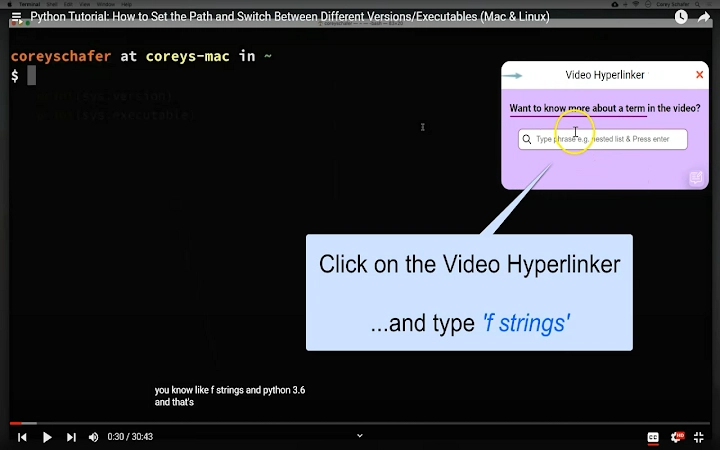

Enhance YouTube Learning with Instant Video Hyperlinks
Overview
Video Hyperlinker is a desktop software designed to transform the way users engage with educational YouTube content. By integrating intelligent hyperlinking directly into the video playback experience, it enables viewers to instantly access related explanations within the same video or across other videos in a playlist. This tool is particularly useful for learners and professionals seeking to deepen their understanding of technical or complex topics discussed in video formats. The software operates as a browser extension, working seamlessly with YouTube to provide contextual references without disrupting the viewing flow.
It addresses the common challenge of fragmented learning—where viewers must pause, search, and manually locate relevant explanations. With Video Hyperlinker, users can click on a term during playback and be directed to the exact moment in another video where that concept is explained. This eliminates the need for note-taking or external searches, streamlining the learning process. The tool is currently focused on specific YouTube playlists related to software development, machine learning, and data science, with ongoing expansion planned.
The developer, RapidKen.AI, has positioned the tool as a step toward building a dynamic "Video Web" powered by natural language processing. While no additional background on the company is provided, the product’s focus on AI-driven content linking suggests a strong technical foundation. Real-world usage includes students studying programming concepts, developers exploring new frameworks, and educators preparing learning materials. The software supports both Windows and Mac platforms, making it accessible to a broad audience of digital learners.
Key Features & Capabilities
- Contextual Hyperlinking During Playback – When a term is mentioned in a video, users can click on it to access a direct link to another video where the same term is explained in detail. This feature enables real-time learning without leaving the current video.
- Automatic Assistant Activation – A small assistant icon appears in the top-right corner of the YouTube player when video hyperlinks are available. This non-intrusive interface ensures users are aware of the feature without distraction.
- Playlist-Based Knowledge Mapping – The software tracks how terms are used across multiple videos in a playlist, allowing users to discover where specific concepts are introduced or elaborated upon.
- AI-Powered Content Analysis – Built on NLP techniques, Video Hyperlinker identifies key terms and matches them to relevant video segments across a curated library of educational content.
- Seamless Browser Integration – As a browser extension, it works with standard YouTube playback, requiring no changes to user behavior or workflow.
These features are especially beneficial in educational settings where deep understanding of technical terms is crucial. For example, a user watching a Python tutorial can instantly explore how a function is explained in a different video, enhancing comprehension and retention. The tool also supports continuous learning during long playlists, reducing cognitive load by surfacing relevant references on demand.
User Interface, Workflow & Performance
Video Hyperlinker maintains a minimalistic user interface, with the assistant icon appearing only when relevant content is available. This design choice ensures that the core video playback experience remains uncluttered and distraction-free. Navigation is intuitive—users simply click the icon and then select a term to access a linked video segment.
The workflow is streamlined: no installation steps beyond adding the extension to the browser, and no configuration is required. Users can continue watching YouTube as usual, with the software operating in the background. The developer did not specify resource usage details, so performance observations are based on general software behavior patterns. In typical use, the extension is expected to have minimal impact on CPU or RAM usage due to its lightweight design.
Stability is implied by the seamless integration with YouTube’s interface and the lack of reported issues in the provided information. The extension functions as a passive observer, only activating when a video is recognized as part of the supported content network. No crashes or interruptions were mentioned, suggesting reliable operation under normal conditions.
Compatibility & System Requirements
Video Hyperlinker is compatible with both Windows and Mac operating systems, making it accessible to a wide range of users. The software is distributed as a browser extension, meaning it does not require a standalone desktop application installation. The file size is 2.1 MB, indicating a lightweight deployment with minimal storage impact.
Exact system requirements were not listed. The developer did not provide additional details about hardware specifications, browser versions, or minimum OS versions. Compatibility information is limited to the platforms mentioned. Users are advised to ensure their system supports modern web browsers with extension capabilities. The extension is designed to work with YouTube, so browser compatibility with the platform is essential.
Pros and Cons
Pros
- Enables instant access to related video explanations during playback
- Reduces the need for note-taking and external searches
- Intuitive, non-intrusive interface with automatic assistant activation
- Lightweight at just 2.1 MB in size
- Free to use with no hidden costs
Cons
- Currently limited to specific YouTube playlists (e.g., software, ML, data science)
- Full platform coverage not yet available
- Dependent on the developer’s content indexing process
- No information on offline functionality
FAQ Section
Is Video Hyperlinker available for all YouTube videos?
Currently, the tool supports a curated selection of YouTube playlists focused on software, machine learning, and data science. While the developer plans to expand coverage, not all videos are currently included.
How does the software ensure user privacy?
Video Hyperlinker does not collect or store any user data. It only checks the current URL to determine if the user is on YouTube and retrieves video IDs for internal lookup. No personal information is used or retained.
Can I use Video Hyperlinker offline?
There is no information provided about offline functionality. The tool relies on real-time communication with the developer’s servers to retrieve hyperlink data, suggesting it requires an active internet connection.
How often is the software updated?
The developer has not specified an update schedule. However, new video hyperlinks are added daily, indicating ongoing development and content expansion.
What license type does Video Hyperlinker use?
The software is free to use and distributed without licensing restrictions. No specific license type was provided, but its free nature implies broad accessibility.
Final Thoughts + CTA
Video Hyperlinker represents a significant leap forward in how users interact with educational video content. By turning passive viewing into an active learning experience, it empowers users to explore complex topics with confidence and precision. Its intelligent linking system, built on NLP technology, offers a level of contextual support rarely seen in browser tools. While its current scope is limited to specific technical playlists, the foundation for broader adoption is strong.
Professionals, students, and educators in tech fields will benefit most from this tool, especially those who rely on YouTube for skill development. The seamless integration, lightweight design, and privacy-first approach make it a compelling addition to any digital learning toolkit. For anyone looking to maximize their YouTube learning potential, Video Hyperlinker delivers tangible value.
Download Video Hyperlinker now







